


Bitmoji
4.5404.62K Reviews
App Specs
- Version
- 11.83.0.1
- Updated On
- License
- Free
- Downloads
- 100,000,000+
- Developer
- Bitmoji
- Categories
- Entertainment
- Platform
- Android, iOS
Screenshots
 Analysis by AppCompare
I like apps that make everyday conversations feel a little more personal, and Bitmoji has a clear purpose: it gives you a small illustrated version of yourself to use in chats. After spending time with it, I see its appeal less as a replacement for ordinary emoji and more as a way to add a familiar face, a specific mood, or a playful reaction when plain text feels flat. Whether that extra personality is worth keeping another app in your routine depends on how often you share stickers and how much you enjoy customizing an avatar.
What it is like to use now
Bitmoji is a free entertainment app from developer Bitmoji. It has a 4.5 average from around 3.6 million ratings, and it has passed 100 million installs. Those figures suggest that the avatar-and-sticker format has found a large audience, but the more useful question for me is whether it fits naturally into the way you already message. Its current version is 11.83.0.1, and it is rated for teens.
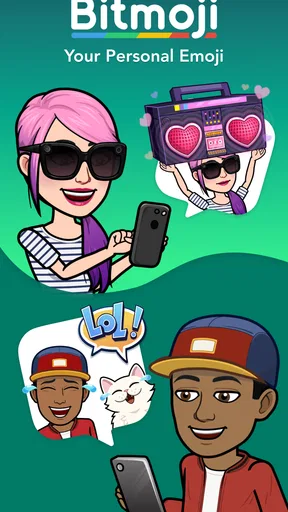
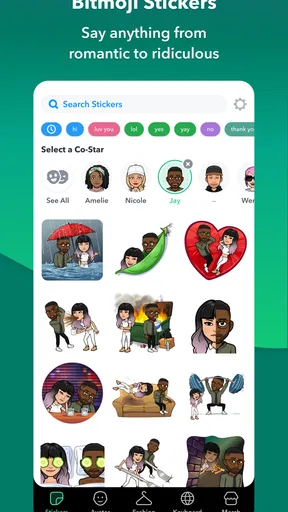
The basic idea is straightforward: build an avatar, then pick from illustrated reactions featuring that character. The result is more specific than sending a standard smiley, but it is still quick enough for casual conversation. I find the strongest use is not trying to replace every emoji; it is choosing a sticker when I want a reaction to feel more like my own voice.
Making an avatar that feels like you
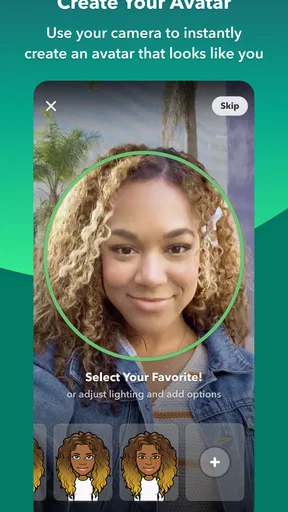
First things first, setting up Bitmoji is a breeze. After downloading the app, you're greeted with an option to create your Avatar. It's almost like a fun little game where you can customize everything from your hairstyle to your outfit. Trust me, you’ll find yourself spending a good chunk of time perfecting your digital twin.
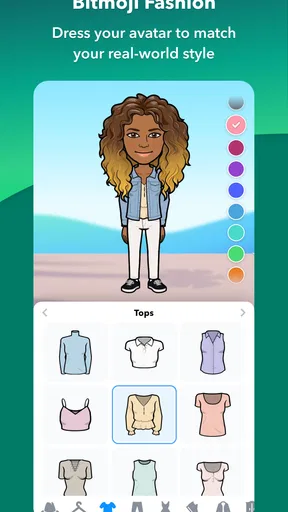
The app offers a pretty extensive range of options, allowing you to choose from different face shapes, skin tones, and hair colors. You can even select makeup and glasses to get that perfect look. The customization doesn't stop there; you can also play fashion designer with a variety of outfits. Whether you're going for casual or formal, the app has you covered.
There is a practical trade-off to that personal likeness. A recognizable avatar can make a sticker feel warm and unmistakably yours, while a deliberately stylized version gives you room to be playful without trying to make a precise portrait. I would spend time first on the features that make the character recognizable at a glance, then revisit clothing and smaller details later. That keeps setup fun rather than turning it into a long attempt to get every pixel right.
Getting stickers into conversations
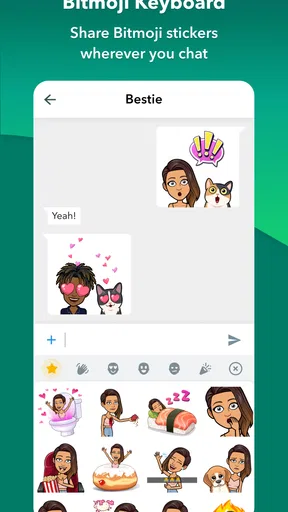
Once your avatar is ready, it's time to unleash it in the wild. Bitmoji integrates seamlessly with your favorite apps like Snapchat, iMessage, and even Gmail. This makes it super easy to insert your avatar into conversations, adding a unique flair to your chats.
Worth Reading Before You Choose

Baby Panda World Brings Quick Play to Modern Phones, but Its Game Library Feels Busy

ESPN’s Live Game View Makes Following Close Games Easier

QuizzLand Review: A Good Fit for Short Trivia Breaks, Not Every Player

Basketball Stars: Multiplayer Is Fast, but Can It Recover When Matches Go Wrong?

WEBTOON Turns Phone Updates Into a Better Reading Routine

Link to Windows Runs on Shared Habits, Not Social Feeds
Using Bitmoji is as simple as switching keyboards on your phone. A quick tap and your personalized emojis are ready to use. The app also updates frequently, offering seasonal outfits and themes, which keeps things fresh and exciting.
In practice, I would treat the sticker keyboard as a shortcut, not a requirement. If you prefer not to switch keyboards while typing, opening the app and choosing a sticker is a reasonable alternative workflow. It is also useful when a chat app handles image stickers differently from emoji: a Bitmoji image can carry more visual character, but it may not behave like a tiny text symbol that sits neatly in a sentence. Before relying on it for a particular conversation, try sending one and see how it appears on the other person’s device.
A realistic example is a busy morning when a friend asks whether you are running late. A quick tired or rushed avatar sticker can answer with a little humor without making you stop to write a whole explanation. For a work message, though, I would usually choose plain text or a conventional emoji; an illustrated character can feel too casual when clarity and tone matter more than personality. That difference is a useful guide to when the app earns its place.
When a sticker says more than an emoji
One of my favorite features is the Bitmoji sticker library. It's like a treasure trove of expressions, all featuring your avatar. Whether you're feeling sassy, happy, or just plain tired, there's a sticker for that. I found myself chuckling at the witty designs that capture just about every mood you can think of.
Another cool feature is the "Friendmoji" option, which lets you pair your Bitmoji with a friend's. It's a fun way to showcase your friendship in a visual and entertaining manner. Plus, who doesn't love seeing their avatars hanging out together?
Friendmoji is most appealing when both people enjoy the joke and recognize themselves in the shared image. I would not assume every recipient wants to be represented in a sticker, so it works best among friends who already use Bitmoji and are comfortable with that kind of playful exchange. For a group chat, a single reaction sticker may land better than sending several in a row; the character is distinctive, but repeated images can take up more attention than a short reply.
How it compares with familiar alternatives
Compared with the emoji already built into a phone, Bitmoji trades universal simplicity for a personal character and a larger range of illustrated moods. Standard emoji are faster to recognize, work as part of ordinary text, and suit nearly any audience. A Bitmoji sticker is more expressive when the avatar itself is part of the joke or message, but it can feel unnecessary when a simple thumbs-up or laughing face does the job.
It also serves a different purpose from a general sticker pack. A pack can offer polished artwork or a theme without asking you to maintain a personal likeness; Bitmoji’s distinctive appeal is that its character represents you. If you mainly want decorative images, a regular sticker collection may be easier. If you like seeing a familiar avatar react across conversations, the extra setup is the point rather than a hurdle.
Keeping the character current
What I appreciate about Bitmoji is how it keeps things fresh with constant updates. New outfits, hairstyles, and accessories are regularly added, ensuring you never get bored. The seasonal themes are particularly fun, letting you dress your avatar in festive attire during holidays.
The app also offers a Bitmoji Deluxe feature, which provides even more customization options. If you're someone who loves to have everything just right, this feature is definitely worth exploring.
There is a small maintenance cost to keeping an avatar current: if your appearance or style changes, you may want to revisit its details, and new clothing choices can tempt you into tweaking an avatar you were already happy with. I would treat customization as optional upkeep, not a task. A recognizable character does not need a new outfit for every occasion to remain useful, and the app is still relevant if you only open it when you want a particular sticker.
Because the app continues to receive version changes, it is sensible to think of the experience as something that can evolve rather than a fixed set of screens. The confirmed current version is 11.83.0.1; that establishes where the app stands now, not what any future update will contain. For someone who has used it for years, the practical test is whether the current avatar still feels like them and whether the stickers they actually use remain easy to find. I would watch for improvements that make those everyday tasks smoother, while treating any hoped-for additions as expectations rather than promises.
Who will get the most from it
I think Bitmoji suits people who message friends often, enjoy a light visual style, and like the idea of a recurring character that can react on their behalf. It is especially handy for someone who uses the same chat spaces regularly: once friends know the avatar, a sticker can become a recognizable personal shorthand. The free price makes it easy to try without turning the decision into a purchase, though the value still depends on whether you reach for it after the novelty of making an avatar wears off.
I would skip it if you rarely send stickers, prefer a clean text-only conversation, or do not want to spend time shaping a character. It is also not my first choice for formal communication, accessibility-focused messages that need to remain unambiguous, or moments when a quick standard emoji is enough. A reader who wants expressive artwork without a self-representing avatar will probably be happier browsing ordinary sticker packs instead.
Small habits that make it work better
One useful habit is to keep a mental distinction between a sticker that adds tone and one that merely repeats the words you already wrote. The former can soften a brief reply; the latter can make a conversation feel cluttered. I also recommend using a sticker as a reaction when the chat context is already clear, rather than sending an image that could be mistaken for a complete answer when the other person needs details.
If you are deciding whether to use the keyboard or open the app, test both in the chat you use most. The quicker route is the one that fits your typing habits, and there is little benefit in changing a phone-wide routine just to use a few stickers. If you share a device or simply prefer not to make an avatar, you can leave the customization aside; the app only becomes personal when you choose to make it so.
Is it worth keeping on your phone?
So, is Bitmoji worth the download? Absolutely! It's a fantastic way to add a personal touch to your digital conversations. The customization options are impressive, and the fun factor is off the charts. Whether you're a social media junkie or just someone who loves a good emoji, Bitmoji is bound to bring a smile to your face.
If you haven't tried it yet, give it a go. It's free, easy to use, and lets you express yourself in a way that words sometimes can't. Plus, who wouldn't want a mini version of themselves to play around with?
My recommendation is enthusiastic but specific: try it if the idea of a personal avatar makes you smile, then judge it by whether you actually use the stickers in real conversations. Its best moments are quick, familiar, and a little silly; its weak moments are the ones where an image adds friction or the wrong level of informality. For me, that makes it a worthwhile option for social chats, not an essential tool for every message or every phone owner.
Pros
- Highly customizable avatars.
- Integrates with various apps.
- Easy to use interface.
- Regularly updated content.
- Fun stickers for messaging.
Cons
- Limited clothing options.
- Some features need internet.
- Can drain battery quickly.
- Occasional app crashes.
- Privacy concerns about data.
FAQs for Bitmoji
What is Bitmoji and how does it work?
Bitmoji is a popular app that allows users to create personalized cartoon avatars. You can customize your avatar’s appearance, outfits, and even expressions. Once created, these avatars can be used in various messaging platforms, social media, and emails to add a personal touch to your communications.
Is Bitmoji free to use?
Yes, Bitmoji is free to download and use. The app offers a wide range of customization options and features at no cost. However, it may offer in-app purchases for additional outfits or accessories, which are optional and not necessary for basic functionality.
Can I use Bitmoji on all messaging platforms?
Bitmoji is compatible with many popular messaging platforms such as Snapchat, WhatsApp, Facebook Messenger, and iMessage. However, integration may vary between platforms. For example, Snapchat has a unique integration that allows you to use Bitmoji in snaps and stories seamlessly.
How do I create and customize my Bitmoji avatar?
Creating a Bitmoji avatar is simple. After downloading the app, you can start by selecting a gender and then customize features like hair, eyes, facial structure, and clothing. The app provides an intuitive interface with a range of options to ensure your avatar reflects your personal style.
Is my personal information safe with Bitmoji?
Bitmoji is designed with user privacy in mind. The app requires minimal personal information to function. It’s important to review the privacy policy before installing the app to understand how your data is used. Always ensure your app is updated to the latest version for the best security features.


